* Path Finder is a Finder alternative that combines the Finder’s interface with the powerful utilities and innovative features. PowerPC Friendly (Demo).
* Path Finder 5.2.2 – Download Here
* Path Finder is a Finder alternative that combines the Finder’s interface with the powerful utilities and innovative features. PowerPC Friendly (Demo).
* Path Finder 5.2.2 – Download Here
I received an e-mail awhile ago asking me how to recover an iPhoto Library. I did some research and I came across this application that I’m sharing with guys because it’s interesting to have installed or download the .DMG file just in case, we never know when the support for PowerPC will end up and the file gone from anywhere.
* REMO RECOVER MAC – 3.0 ( 3.0.1) – (Data / Files) – PowerPC Friendly (Leopard 10.5). (Demo) – DOWNLOAD HERE . Safe and easy recovery data from Mac OS X. The powerful built-in scanning algorithm helps in finding and recovering deleted files, files lost due to application errors, deleted or missing volumes, re-formatted volumes and re-partitioned Mac drives and also recover deleted files, which have been emptied from Trash.
* REMO – (Recover Deleted iPhoto Library) – Check instructions – HERE . Safe and fast recovery of photos from deleted iPhoto library.
Awesome application and I think most of us PowerPC user should have installed for our own benefit.
* Chipmunk 1.5.4 – Leopard 10.5.+ – http://www.furry-rodents.com/
* Chipmunk 1.2 – Tiger 10.4.+
Find all duplicates. Fast. Find duplicates where ever they are what ever name they have. Chipmunk considers strictly content. No mucking about with creation dates and file names and stuff. You will be amazed how quickly Chipmunk eats through hundreds of megabytes, considering it compares the content of these files.
Search all drives connected to your Mac If you can access it you can search it. External drives, network shares, removable media, you name it.
Delete duplicates more intelligently Delete all files in a folder that have duplicates elsewhere. Or vice versa: Delete all files outside a folder that have duplicates inside it. Or hand pick your candidates, of course.
Undo, Retrieve From Trash You have been too quick on the trash button? Not a problem, just hit Undo. You can also retrieve files selectively from the trash. Quick Look, Reveal In Finder and Growl Support Quick Look or reveal any file you like in Finder (Quick Look available only when run on Leopard)
…and bingo, TeamSpeak 3 or (3.0.13.1) works on PowerPC – Leopard 10.5.8. It’s cross platform VoIP with crystal clear voice communication. Great application!
* TeamSpeak 3 (Demo) – http://www.teamspeak.com/
TeamSpeak 3 continues the legacy of the original TeamSpeak communication system previously offered in TeamSpeak Classic (1.5) and TeamSpeak 2. TeamSpeak 3 is not merely an extension of its predecessors but rather a complete rewrite in C++ of its proprietary protocol and core technology.
With over nine years of experience and leadership in the VoIP sector, our engineers have created a flexible, powerful, and scalable solution granting you the ability to customize and tailor your voice communication needs any way you desire. New users and TeamSpeak veterans alike will now enjoy a completely new experience in voice communication using TeamSpeak 3’s unmatched functionality and powerful new features.

The question before I write this post is Why we do not save our documents? I just lost my entire post because of sheer laziness… Lesson learned and now it’s time to move on!
We have been posting here for awhile now and my PowerPC friends know that I always try to find free or low cost applications to share for many reasons. Sometimes I come across some non-free applications that I think my readers would be interested in, and post them anyways. These products often have features that the free ones do not…
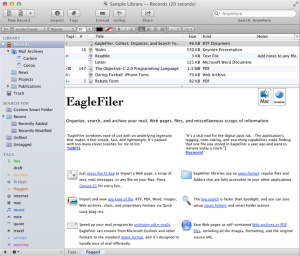
EagleFiler 1.5.10 (Demo) – PowerPC 10.4 – Tiger / 10.5 – Leopard. It’s an easy way to archive and manage all your documents, and various other pieces of information including e-mails, web pages, etc. Organize everything into folders and add tags and notes to make it easier to search for later!
* http://c-command.com/eaglefiler/ (Go Support for the version 1.5.10). The new version is not compatible on PowerPC.
In this post I will go straight to the point because I do not often use these kind of applications and I don’t really need it for my regular day to day use. As you know, MacPowerPC is very openminded and we recognize that there are people out there that will be very happy with this kind of application. Annotation Edit is a professional editor for subtitles, captions and annotations. There are numerous unique features and it does an exceptionally professional job! Give it a try?
* Annotation Edit 1.9.27 – http://www.zeitanker.com/content/download/annotation_edit_demo – (Demo – $326) – PowerPC 10.4/10.5 (Tiger/Leopard)
Download here: https://www.macupdate.com/app/mac/23516/annotation-edit
Facebook is one of the sole reasons people spend more time in front of a computer than ever before. Personally, I blame timeline because for some reason you always want to check what your friends are doing/sharing. I have a really small list of friends/family and I only add family and friends that I know “in real life”. But anyways when it comes to PowerPC users we are very limited in finding Facebook applications compatible with our system. Some time ago I posted about a menu tab and recently found another option to share with you today:
* Facebook Desktop 1.9 (Shareware) – PowerPC Leopard 10.5. It looks like a browser but its very dynamic and already has tabs for Facebook, Twitter, Chat and Lifestyle. It’s really nice to browse and it ran very well on my iBook 1.07GHz. The only problem is this is a Demo version and you can only run it for 5 minutes at a time. The developer’s web site it’s offline so it’s hard to contact them to get a serial number. Anyways I still think its a good application to share with you:
Download here: http://download.cnet.com/Facebook-Desktop/3000-12941_4-75058655.html?tag=mncol;4
Recipe formulation tool for brewers.
BeerAlchemy (Demo – $15.00) PowerPC 10.4 / 10.5 – Tiger / Leopard. http://beeralchemy.en.softonic.com/mac
All Mac PowerPC users are well aware that when it comes to Social Networking our applications are limited. It’s hard to find something that might work well for Mac OS X Tiger. In fact it’s virtually possible to find options for the Mac OS X Leopard. I actually still prefer use a good old fashioned Browser, when it comes to searching for these types of media. But this post doesn’t end here, previously we mentioned some applications for Twitter and we got really great feedback from our readers and I wanted to share some more options with you here. the list starts with:
* Echofon 1.5.7 – Twitter Client (I didn’t find a safe web-site to download from, but as far as I can ascertain, this version might work on PowerPC 10.5 / Leopard. If you find or have a safe .dmg file please share with us. http://mac.brothersoft.com/echofon.html / Echofon download here: http://www.milocker.com/pg/file/read/79630/echofon-for-leopard-powerpc Thanks @rjCalifornia
* YoruFukurou 1.65 PowerPC 10.5 / Leopard https://sites.google.com/site/yorufukurou/home-en Download here – http://www.macupdate.com/app/mac/35286/yorufukurou
* TwitQwik 2.0.0 (Free) Fastest way to tweet. – http://mac.brothersoft.com/twitqwik.html
* Twit Menulet 8 (Demo $6.00) – PowerPC friendly 10.3 / 10.4 / 10.5 – http://www.macupdate.com/app/mac/32331/twit-menulet – With this app it will allow you to check your tweets from a menu bar. Never was it so easy to keep Twitter on and check as many times you want. If anyone is running Panther, please let me know if it worked out for you!
My Facebook friend Gregory will be very happy because I finally got some time to check out the application that he mentioned on Mac PowerPC’s Facebook Page a long time ago, which I had bookmarked but never had enough time to get to. Here you go!
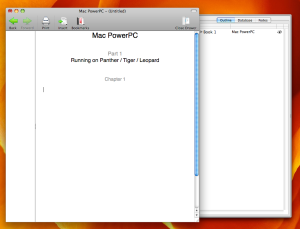
* Jers Novel Writer 1.1.12 – (Demo $30.00) – http://jerssoftwarehut.com/jers-novel-writer/download-jers-novel-writer – PowerPC friendly Panther / Tiger / Leopard – 10.3/10.4/10.5 – It’s a simple but not restricted writing application. I’m very impressed with the quality of this word processor, as it has everything to keeping you writing and saving your ideas without messing things up. It has a main window like any other word processor but the coolest feature is that it has a tab running along the side that allows you see all your other saved projects! It also has a notes tab that allows you to post all your brainstormed ideas and subjects that keep you on track as you write. In my opinion, this is great software that totally deserves to be installed on your machine. Attention Writers: Now it’s time to make your Mac buddy work a little bit harder.
QuarkXpress is a professional and very powerful page layout and graphic design software that lets anyone create and publish rich, compelling material for print, the web and other digital media using one easy tool. Its proven QuarkXpress is the must have software for in house, agency and independent designers. The newest version 9.5 is Intel only but looking back, I found some previous version that are PowerPC friendly.
* QuarkXpress – 8.5.1 – 10.4/10.5 (Tiger/Leopard) – (Free 30 days Test Drive) – http://www.quark.com/Products/QuarkXPress/ – Before purchasing, please contact the developers to make sure they will provide the right version and the compatible license, because you are required to sign-up before you can download, and try it for free.
* http://www.quark.com/en/Support/Downloads/Details.aspx?fid=200
System Requirements (page:5) – http://files.quark.com/download/documentation/QuarkXPress/8.5/English/QXP_8.5.1_ReadMe_en-us.pdf
I just found myself in a situation that I never would have thought I’d find myself in. I’m the kind of Mac user that thinks I don’t need anything from Microsoft (wrong). I always choose to format my external hard-drives using Mac OS Extended (Journaled) even when I know that it would be “safe” to format on FAT32. Recently, I was traveling a few weeks ago and I met a good friend of mine that wanted me to share some of my files with him and vice versa. When I plugged in my hard drive, I could not transfer any of my files because it was locked. When I realized that his hard drive was formated to NTFS…well I just became sad. So back I went to http://google.com (like always) and here I found few options that helped me out, that I’d like to share with you.
NTFS 3G – 2010.10.2 (Free) http://macntfs-3g.blogspot.ca/ . Download here: http://sourceforge.net/projects/catacombae/files/NTFS-3G%20for%20Mac%20OS%20X/2010.10.2/ntfs-3g-2010.10.2-macosx.dmg/download
Tuxera NTFS 2012.3.4 – (Demo $31.00) – http://www.tuxera.com/products/tuxera-ntfs-for-mac/ 10.4 / 10.5 – Tiger / Leopard PowerPC.
* MacFuse – 2.0 (Free) – http://code.google.com/p/macfuse/ . 10.4 / 10.5 – Tiger / Leopard PowerPC
* OSXFUSE – 2.5.4 – (Free) – http://osxfuse.github.com/ . 10.5 – Leopard.
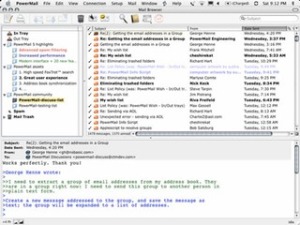
This software probably has a different kind of user in mind. I don’t think “home users” would pay $70 for an e-mail client, but perhaps business users or someone that has to deal with thousands of e-mails everyday should take a look at this application.
One of the most important things to know about PowerMail is that it’s a heavy duty application and it will help you to manage your e-mail very fast/easy. For more information visit: http://ctmdev.com
* PowerMail (10.4 Tiger / 10.5 Leopard) (Demo) – http://www.ctmdev.com/powermail/